
1. Introduction
NotebookLM is great, but I don't love uploading my notes, contracts and half-finished ideas to someone else's cloud.
So I asked myself: what if you could have the core of NotebookLM (chat with your own documents) running 100% offline, on a fan-less mini-PC that costs ~€150 and sips 6 watts?
You can. In this lab we build it from scratch, and above all we explain the code line by line, because the point is not to copy and paste, but to understand why each piece is there.
2. Requirements
We need an Intel N100/N300 mini-PC (4-8 cores, no dedicated GPU, ~16 GB RAM), Python 3, a folder with real .txt, .md or .pdf files, and internet only once to download and convert the models. After that, pull the cable.
The trick to making an LLM usable on an N100 is a holy trinity: small model + INT4 quantization + OpenVINO (Intel's inference runtime).
3. What we will build
- Read
.txt,.mdand.pdf(tables included). - Chunk them into manageable pieces.
- Turn each chunk into a vector stored in a local FAISS index.
- For each question, retrieve only the relevant chunks.
- Hand the small model only those chunks and stream the answer.
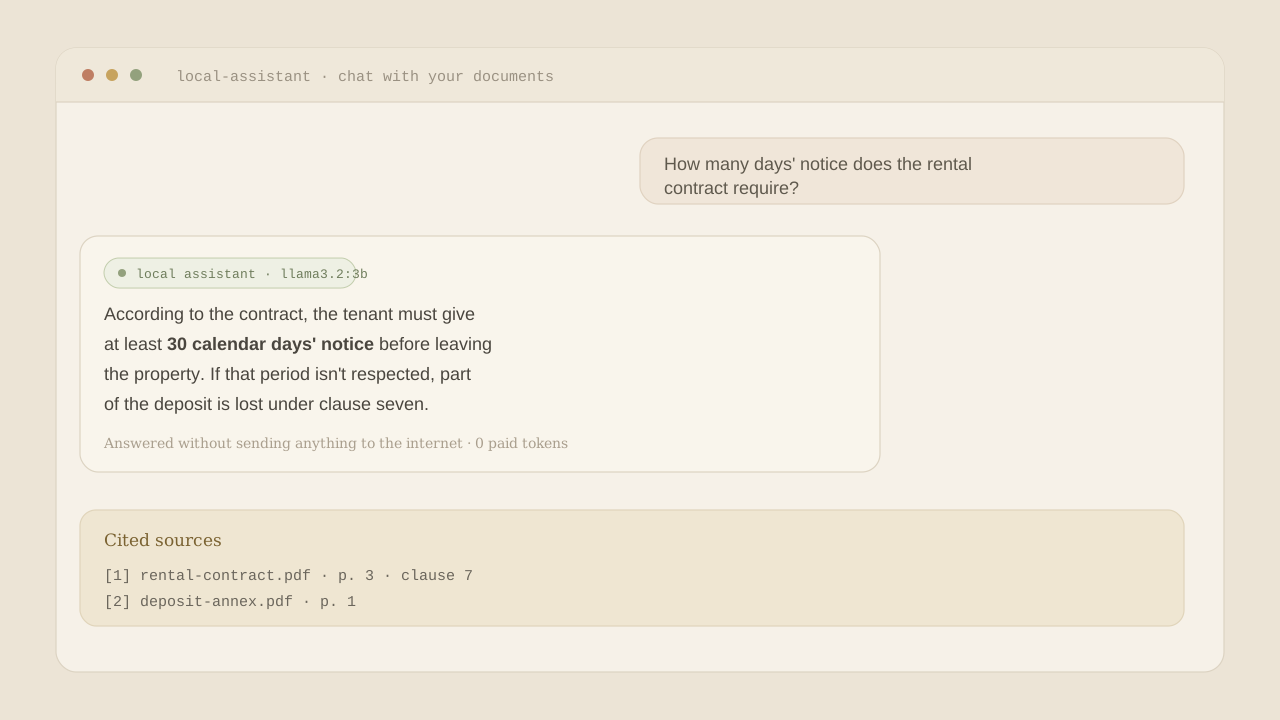
- Cite which document each answer came from.
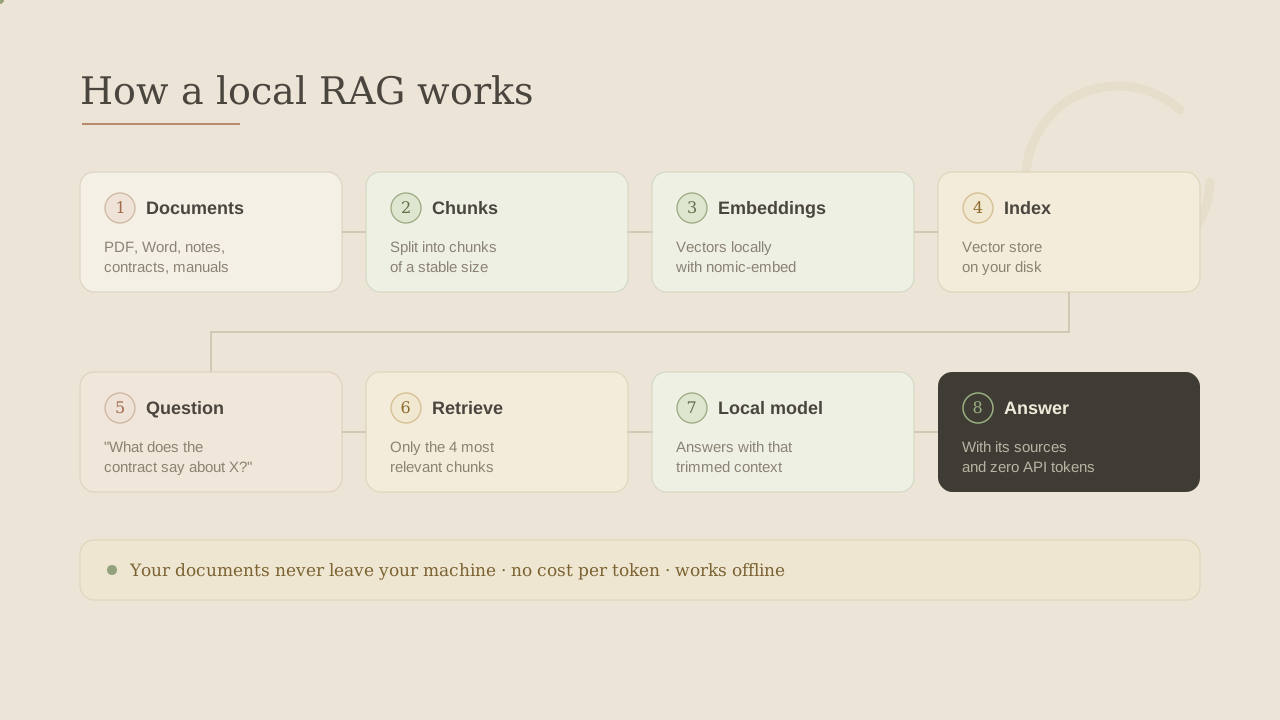
4. What a RAG is (and why it fits in a mini-PC)
RAG stands for Retrieval-Augmented Generation. Fancy name, simple idea.
Think of a language model as a brilliant writer with two catches. First, it only remembers what it studied back in the day. Second, it works at a tiny desk that only fits a few sheets at a time; that desk is the context window. So you can't drop a 300-page PDF in front of it: it won't fit on the desk, and even if it did, reading it all would be slow and expensive.
The fix isn't to make the writer memorize your whole library, but to sit a good librarian next to them.

The librarian does four things:
- Chop documents into small chunks.
- Turn each chunk into a vector and store it in a vector database.
- Turn the question into a vector too, and find the closest chunks.
- Hand the model only those chunks and say: "answer using this."
The model never reads the whole book; the librarian finds the right pages. That's why it fits in a mini-PC.
your docs ──► chunks ──► embeddings ──► vector store (FAISS)
                                              │
question ──► embedding ──► find top-K relevant chunks
                                              │
                  the small model writes the answer from those chunks
5. The stack in one breath
- LangChain orchestrates the pipeline (loading, splitting, embeddings, retrieval).
- OpenVINO runs both models fast on Intel CPU.
- FAISS is a tiny, server-less, local vector database.
- multilingual-e5-small is a featherweight (~118M) multilingual embedder.
- Qwen2.5-0.5B-Instruct is a small, capable model that flies on the N100.
6. Step 0: one config for everything
Everything tweakable lives in a single config.py:
LLM_MODEL_ID = "Qwen/Qwen2.5-0.5B-Instruct"
EMBED_MODEL_ID = "intfloat/multilingual-e5-small"

DEVICE = "CPU"            # the N100 has no real GPU

CHUNK_SIZE = 1000         # characters per chunk
CHUNK_OVERLAP = 120       # overlap so sentences aren't cut in half
RETRIEVER_K = 3           # chunks fed to the model per question
MAX_NEW_TOKENS = 256      # short answers -> much lower latency on CPU
The two values you'll feel: RETRIEVER_K (how much context we retrieve) and MAX_NEW_TOKENS (how long answers can get). On a CPU, every token costs time.
7. Step 1: reading your documents (txt, Markdown, PDF)
Text and Markdown are trivial; PDFs are the tricky ones. PyMuPDF4LLM extracts PDFs as Markdown and rebuilds tables into | col | col |, which small models understand well.
def _load_pdf(path):
    from langchain_core.documents import Document
    try:
        if config.PDF_FAST:                 # speed mode: plain text, no tables
            import pymupdf
            with pymupdf.open(str(path)) as doc:
                text = "\n".join(page.get_text() for page in doc)
        else:                               # default: tables -> Markdown
            import pymupdf4llm
            text = pymupdf4llm.to_markdown(str(path))
        return [Document(page_content=text, metadata={"source": str(path)})]
    except ImportError:
        from langchain_community.document_loaders import PyPDFLoader
        return PyPDFLoader(str(path)).load()   # graceful fallback
Note the metadata={"source": ...}: we track where each chunk came from, so we can show citations later. And the except ImportError is a graceful plan B.
8. Step 2: chunking without cutting sentences in half
The librarian doesn't photocopy the whole book: they turn it into index cards. Instead of filing one giant document, we cut it into small, manageable cards. And we cut carefully, letting each card share a little bit with the next one, so no important sentence is sliced right on the cut line.

from langchain_text_splitters import RecursiveCharacterTextSplitter

splitter = RecursiveCharacterTextSplitter(
    chunk_size=config.CHUNK_SIZE,
    chunk_overlap=config.CHUNK_OVERLAP,
    add_start_index=True,
)
chunks = splitter.split_documents(docs)
RecursiveCharacterTextSplitter is smart about where it cuts: paragraphs first, then sentences, then words. The chunk_overlap repeats a bit between chunks so a key sentence isn't lost at the seams.
9. Step 3: embeddings accelerated by OpenVINO
Two jargon words show up here: embedding and vector database. Back to the librarian.
Imagine the librarian files the cards not alphabetically but by meaning: cards about the same thing sit together. To do that, each card gets coordinates based on what it means: that's the embedding (a list of numbers placing the text on a "map of meaning"). The whole map, with all those coordinates stored so you can search it, is the vector database.
The magic: two texts that mean something similar land close together on the map, even if they don't share the same words. So when a question arrives, we drop it on the map too and look at which cards are next to it.

In code, each chunk becomes that vector via the embedding model. The key detail for an N100: we run it through OpenVINO and embed in batches, which makes indexing dramatically faster:
from langchain_community.embeddings import OpenVINOEmbeddings

OpenVINOEmbeddings(
    model_name_or_path=str(config.EMBED_OV_DIR),
    model_kwargs={"device": config.DEVICE},
    encode_kwargs={
        "normalize_embeddings": True,
        "mean_pooling": True,
        "batch_size": config.EMBED_BATCH_SIZE,   # bigger batch = faster ingest
    },
)
normalize_embeddings keeps vectors comparable, mean_pooling collapses each chunk into one vector, and a bigger batch_size speeds up ingestion at the cost of RAM.
10. Step 4: the FAISS index, updated incrementally
We keep a small manifest.json of what's already indexed and only embed the new stuff:
new_files = [f for f in current if f not in manifest]
changed_or_removed = any(manifest.get(f) != current.get(f) for f in manifest)

if not index_exists() or changed_or_removed:
    FAISS.from_documents(chunks, embeddings).save_local(str(config.INDEX_DIR))
    _save_manifest(current)
elif new_files:
    store = load_index(embeddings)
    store.add_documents(chunks)
    store.save_local(str(config.INDEX_DIR))
    _save_manifest(current)
Add a document, only that document gets embedded. Change or delete one, we rebuild to stay correct.
11. Step 5: the brain, a small LLM that streams
We load Qwen2.5 quantized to INT4 through OpenVINO and stream the answer token by token so the UI never feels frozen:

def stream(self, question, context):
    from threading import Thread
    from transformers import TextIteratorStreamer
    inputs = self._build_inputs(question, context)
    streamer = TextIteratorStreamer(self.tokenizer, skip_prompt=True,
                                    skip_special_tokens=True)
    Thread(target=self.model.generate,
           kwargs=self._generate_kwargs(inputs, streamer)).start()
    for token in streamer:
        yield token        # tokens flow out as they're generated
We run generate in a separate Thread so the main loop can yield tokens as they appear. Two more tricks: the prompt tells the model to answer only from the context and to finish its sentences within a word budget, and no_repeat_ngram_size stops tiny models from looping.
12. Step 6: the full RAG loop
docs = retriever.invoke(question)        # 1. find the relevant chunks
context = core.format_context(docs)      # 2. stitch them into a context block
for token in llm.stream(question, context):   # 3. stream the grounded answer
    print(token, end="", flush=True)
sources = core.sources_of(docs)          # 4. show where it came from
Retrieve → stuff into the prompt → generate → cite. Everything else is UI and plumbing.
13. Step 7: two front-ends for the price of one
Because all the logic lives in core.py, the interfaces are thin: a terminal one (chat.py) and a Streamlit web one (app_web.py).
docs = retriever.invoke(question)
context = core.format_context(docs)
answer = st.write_stream(llm.stream(question, context))   # streams live
st.caption("Sources: " + ", ".join(core.sources_of(docs)))
st.write_stream + our token generator = a ChatGPT-like typing effect, fully local. Open http://localhost:8501 and chat with your documents.
14. Step 8: downloading and quantizing the models
One last bit of jargon: quantization. Picture the original model as a huge trunk (every weight stored in lavish detail, in 16 bits) that won't fit through the mini-PC's door. Quantizing to INT4 is repacking it into a carry-on: we store each weight with less detail (4 bits instead of 16), drop the fluff and keep what matters. The result is a fraction of the size and, crucially, it fits and runs comfortably on the N100.
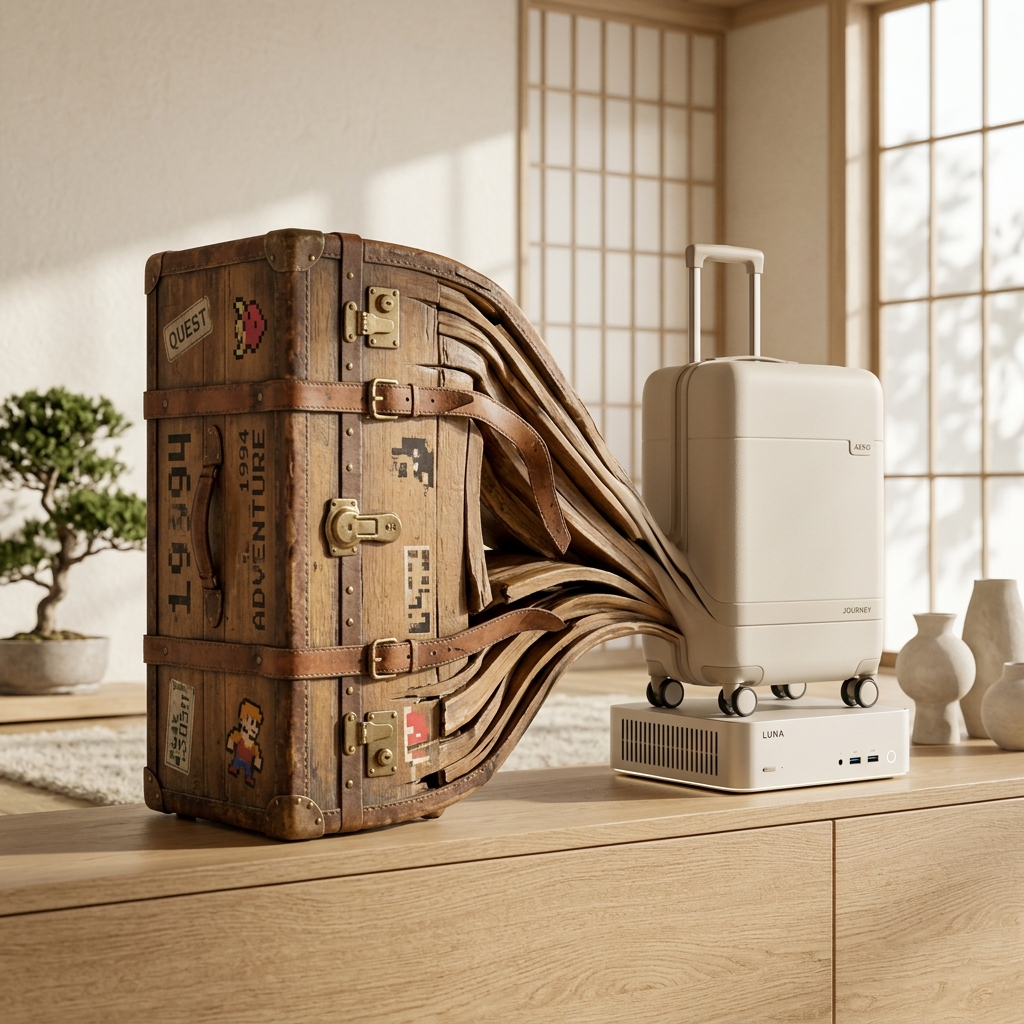
The only online moment is converting the models to OpenVINO's format. We pack exactly that "carry-on": quantizing the SLM to INT4 (weight-only, data-free):
optimum-cli export openvino \
  --model Qwen/Qwen2.5-0.5B-Instruct \
  --weight-format int4 --group-size 128 --ratio 1.0 \
  --task text-generation-with-past  models/llm-...-int4
--weight-format int4 stores weights in 4 bits, --task text-generation-with-past keeps the KV cache for fast token-by-token generation. Run it once, then go offline forever.
15. Two war stories
- The export got OOM-killed on my NAS. Quantizing needs several GB of RAM temporarily. Add swap, or export on a beefier machine and copy the (tiny) result over.
iostream erroron export./tmpwas a RAM-backedtmpfs; OpenVINO filled it and died. PointingTMPDIRto a real disk fixed it.
16. What's cooking next
- Pick the model from the UI (fast 0.5B vs smarter 1.5B), load on demand.
- Drag-and-drop uploads from the web UI.
- OCR for scanned PDFs and screenshots (e.g. RapidOCR on OpenVINO).
- Captions for charts via a tiny vision model.
- More speed: prompt-lookup / speculative decoding and a go at the iGPU.
17. I want the workflow and the code!
Install deps and convert the models to INT4 once, drop your files into documents/, index incrementally into FAISS, ask questions and stream grounded answers with sources, and pick terminal or web. Then unplug the network and enjoy a private 6-watt NotebookLM. The recipe — small model + INT4 + OpenVINO, glued with LangChain and FAISS — is genuinely practical today.
You can find the code in our Github repo: sttokens_mynotebookslm